Hi
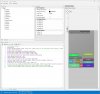
I build a layout with backimage and a few button
I set the button's location with Designer Script
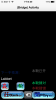
In the Visual Designer, I click the run button, In the iPhone's (Bridge)Activity is all right
when I close the Designer and click the b4i run button
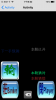
the display is not same like the Designer
the button in the layout is too big
what wrong with me? '
thank you
I build a layout with backimage and a few button
I set the button's location with Designer Script
In the Visual Designer, I click the run button, In the iPhone's (Bridge)Activity is all right
when I close the Designer and click the b4i run button
the display is not same like the Designer
the button in the layout is too big
what wrong with me? '
thank you